
通过 Workload Identity Federation 安全访问 Claude Platform
Secure access to the Claude Platform with Workload Identity Federation
Workload Identity Federation (WIF) is now generally available on the Claude Platform. WIF is compatible with any OIDC-compliant identity provider and covers all Claude API endpoints, including when accessing the endpoints through our first-party SDKs and Claude Code.
With WIF for workloads and ant auth login for interactive sessions, developers never have to handle a static API key when building with the Claude Platform.
How Workload Identity Federation works
WIF replaces static API keys with short-lived, scoped credentials issued at request time. Whether you're a two-person startup running GitHub Actions or an enterprise with detailed credential policies, you can now authenticate with the Claude Platform the same way you authenticate with the rest of your stack.
With WIF, there are no static Anthropic credentials to create, rotate, or leak. Workloads authenticate with the identity they already have: an AWS IAM role, a GCP or Kubernetes service account, an Azure managed identity, a GitHub Actions token, Okta, or other OIDC-compliant providers.
We're also introducing service accounts to the Claude Platform, so each workload can have its own identity, roles, and audit trail instead of a shared API key. First, a federation rule binds an external identity to a service account. Then, when a workload requests access, the Claude Platform verifies the workload's signed OIDC token, matches its claims against your federation rules, and issues a short-lived access token bounded by the service account's roles. Every exchange and request is recorded against that service account in your audit logs.
Set up your first workload in minutes
The Claude Console has a guided setup flow for configuring workload identities. The setup validates each step and finishes with a test command that confirms your workload can authenticate.
Run your whole organization without static keys
WIF is compatible with the Admin API for organization management. Federation rules can be configured for least-privilege access through fine-grained scopes.
Federation configuration is also fully programmatic for organizations operating at scale. New Admin API endpoints let you create and update issuers, service accounts, and federation rules.
Getting started
API keys work alongside WIF, so you can migrate one workload at a time. Read the setup guides for each identity provider, or open the Claude Console to connect your first workload.
通过 Workload Identity Federation 安全访问 Claude Platform
原文:Secure access to the Claude Platform with Workload Identity Federation
Workload Identity Federation(WIF,工作负载身份联合)现已在 Claude Platform 上正式可用(GA)。WIF 兼容任何符合 OIDC(OpenID Connect 身份认证协议)标准的身份提供方,覆盖所有 Claude API 端点——包括通过我们的第一方 SDK 和 Claude Code 访问这些端点的场景。
有了面向工作负载的 WIF,以及面向交互式会话的 ant auth login,开发者在基于 Claude Platform 构建时,再也不必经手任何静态 API key。
Workload Identity Federation 如何工作
WIF 用短时、限定作用域、在请求发生时即时签发的凭据,取代了静态 API key。无论你是在跑 GitHub Actions 的两人创业团队,还是有一整套精细凭据策略的大企业,现在都能用和你技术栈里其余部分一样的方式,向 Claude Platform 完成认证。
用上 WIF 后,就没有任何静态的 Anthropic 凭据需要创建、轮换,也就无从泄露。工作负载直接用它本就拥有的身份来认证:一个 AWS IAM role、一个 GCP 或 Kubernetes service account、一个 Azure managed identity、一个 GitHub Actions token、Okta,或其他符合 OIDC 标准的提供方。
我们同时为 Claude Platform 引入了 service account(服务账号),这样每个工作负载都能拥有自己独立的身份、角色和审计轨迹,而不必再共用一把 API key。流程是这样的:首先,一条 federation rule(联合规则)把一个外部身份绑定到某个 service account。之后,当某个工作负载请求访问时,Claude Platform 会校验该工作负载签名后的 OIDC token,把 token 里的 claims(声明,即携带的身份字段)与你的 federation rule 进行匹配,再签发一个受该 service account 角色范围限定的短时访问 token。每一次 token 交换、每一次请求,都会记到该 service account 名下,进入你的审计日志。
几分钟配好你的第一个工作负载
Claude Console(控制台)提供了一套引导式配置流程来设置工作负载身份。这套流程会逐步校验每一步,最后给出一条测试命令,确认你的工作负载确实能完成认证。
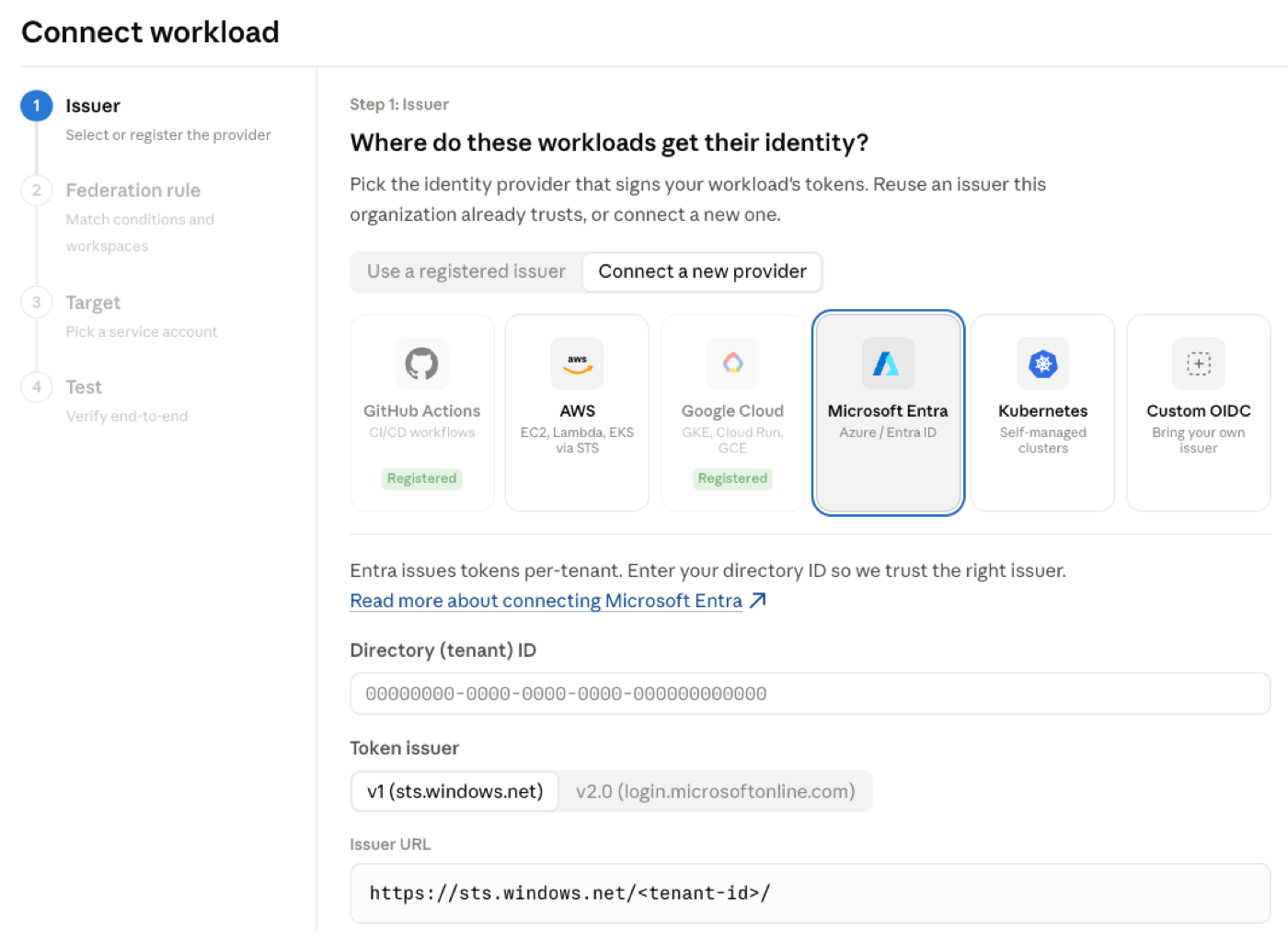 *图:Claude Console 中配置工作负载身份的引导式设置流程,会逐步校验并以一条测试命令收尾。*
让整个组织摆脱静态 key
WIF 兼容用于组织管理的 Admin API(管理 API)。可以通过细粒度的 scope(作用域)来配置 federation rule,实现最小权限访问。
对于大规模运行的组织,整套联合配置也完全可编程。新增的 Admin API 端点让你能创建和更新 issuer(签发方)、service account 以及 federation rule。
开始上手
API key 与 WIF 可以并存,所以你可以一个工作负载一个工作负载地逐步迁移。针对每种身份提供方的配置,请阅读对应的设置指南,或者打开 Claude Console 直接接入你的第一个工作负载。