
驾驭 Claude Code:CLAUDE.md 文件、skills、hooks、rules、subagents 等机制全解
Steering Claude Code: CLAUDE.md files, skills, hooks, rules, subagents and more
Claude is built to work the way you work, and in Claude Code you can customize it.
There are seven methods for instructing Claude's behavior: CLAUDE.md files, rules, skills, subagents, hooks, output styles, and appending the system prompt.
The table below provides a quick summary of key differences across each method while the post provides additional detail and decision framework for determining where each of your Claude instructions belongs.
The seven methods for delivering instructions
CLAUDE.md files
CLAUDE.md is a markdown file at the root of your project. It loads into context at session start and stays there for the entire session.
Build commands, directory layout, monorepo structure, coding conventions, and team norms all fit naturally here.
In a shared repository, CLAUDE.md grows the way any unowned config file does: every team appends its own instructions and nothing gets deleted. The cost compounds at scale.
Every line loads into every session for every engineer working in the repo, whether it's relevant to their task or not. This consumes tokens and dilutes adherence to the instructions that actually matter. As the file grows, push team-specific conventions into path-scoped rules and procedures into skills, where they load only when relevant.
Tip: Keep CLAUDE.md under 200 lines, give it an owner, and review changes to it like code. Think of this file as giving Claude an overview of your codebase, or as an index pointing to other files where Claude can find more information as needed.
In monorepos, give each team's directory its own subdirectory CLAUDE.md so teams only load their own conventions, and developers can use the claudeMdExcludes setting to skip files from teams whose code they never touch.
For standards that must apply to every repository in the organization — security policies, compliance requirements — a centrally managed CLAUDE.md can be deployed to developer machines via MDM or config management, and it can't be excluded by individual settings.
More on setting up CLAUDE.md in our blog post, CLAUDE.md files: Customizing Claude Code for your codebase.
Rules
Rules are markdown files in .claude/rules/ that give Claude specific constraints or conventions.
Unscoped rules behave like CLAUDE.md in that they are always loaded at session start and get re-injected on compaction. This can waste tokens by loading context even when it's not relevant for the task at hand.
Path-scoped rules allow you to load rule instructions only when they are relevant by adding a paths field that controls when they load.
For example: a rule scoped to src/api/** stays out of context during a docs-only session. It would only be loaded whenever Claude reads files within that src/api/ directory.
Tip: A file-specific constraint, like "migrations are append-only," fits best as a rule placed in your paths: frontmatter. Reach for a path scoped rule over a nested CLAUDE.md file when the instruction regards a cross-cutting concern or file that appears in multiple (but not all) corners of the codebase.
Skills
Skills live in .claude/skills/ as folders of instructions, scripts, and resources that Claude loads dynamically. Each skill has a SKILL.md file with a name, description, and body.
Only the name and description load at session start; the full body loads when Claude invokes the skill, either through a slash command (/code-review) or by auto-matching the task.
For example, /code-review is a built-in skill that reviews your current diff and reports its findings without editing files. The skill defines the playbook so Claude follows the same structured approach every time you invoke it.
On compaction, Claude Code re-injects invoked skills up to a total budget across all invoked skills. If you’ve invoked many skills during a session, the oldest ones drop first.
Tip: Instructions that are procedural, like deploy workflows, release checklists, or review processes, belong in a skill rather than in CLAUDE.md.
Claude Code ships with skills, but you can also write your own custom skills. Our complete guide to building skills for Claude shows you how.
Subagents
Subagents are markdown files in .claude/agents/ that define isolated assistants for specific side tasks. Each file uses YAML frontmatter (name, description, plus optional fields for model and tool access) followed by a body that becomes that subagent's system prompt.
Subagents are similar to skills in that the name, description, and tool list load at session start, but the larger context within the body of the agent doesn’t auto-invoke. Claude calls them via the Agent tool, passing in a prompt string.
Not only does the larger instructional context within the body of the subagent not auto-invoke, it never enters the parent conversation at all.
The subagent then runs in its own fresh context window, and the only thing that returns to your main session is the subagent’s final message (often the aggregated result of many subtasks) plus metadata.
This pattern scales: subagents can nest up to five levels deep, and dynamic workflows orchestrate tens to hundreds of background agents without requiring you to specify each detail of the subagent architecture. The orchestration plan and intermediate results live in script variables rather than in Claude’s context window, which enables scale without losing instructional fidelity.
Tip: That isolation is one of the main reasons to reach for a subagent instead of a skill. Use a subagent when a side task like deep search, a log analysis pass, or a dependency audit would clutter your main conversation with intermediate results you won't reference again. Use a skill when you want the procedure to play out inside the main thread so you can see and steer each step.
Hooks
Hooks are user-defined commands, HTTP endpoints, or LLM prompts that provide more deterministic control over Claude’s behavior by firing on specific events in Claude’s lifecycle like file edits, tool calls, or session start.
You register hooks in settings.json, managed policy settings, or skill/agent frontmatter.
There are several types of hooks: command, HTTP, mcp_tool, prompt, and agent. All hooks are deterministically triggered. The first three execute deterministically while the latter two, prompt and agent, use Claude’s judgment rather than a set of rules to determine the output.
Hooks have low context costs because the configuration or instruction lives outside the main context window. The harness runs the handler (command, http, mcp_tool) or makes model calls with separate windows (prompt, agent) depending on the hook type.
Some hooks may have the output saved to the main context window. For example, a blocking hook's standard error is saved within context so Claude knows why the call was denied.
But most hooks won’t have the output saved to the main window unless the configuration explicitly returns it. If you backed up your chat history into another file for later reference before compaction using the PreCompact event, Claude wouldn’t know which file had the chat history saved.
This makes these hook types fundamentally different from CLAUDE.md, rules, and skills. You can learn more in our post how to configure hooks.
Tip: Use hooks for anything that should happen deterministically: running linters after edits, posting to Slack on completion, or blocking specific commands before they execute. A PreToolUse hook can inspect any tool call and exit code 2 to deny it.
They have low context cost because they are code that the harness runs rather than instructions to Claude that get loaded into context.
Output styles
Output styles are files in .claude/output-styles/ that inject instructions into the system prompt. They never get compacted, load at the start of every session, and are cached after the first request within a session, meaning they have a moderate context cost.
Because they sit in the system prompt, output styles carry the highest instruction-following weight of any method that we've covered so far and should be used judiciously.
Changes to the output style will replace the default output style (unless you set keep-coding-instructions: true in the style's frontmatter).
In Claude Code, this would remove instructions that tell Claude it is helping users with software engineering tasks and contains other critical default instructions such as:
By default, a custom output style drops all of this and Claude Code becomes more of a general assistant than a software engineer assistant.
Tip: Before writing a custom output style, check the built-in styles. Proactive, Explanatory, and Learning cover the most common needs (autonomy, teaching mode, collaborative coding) without you having to maintain a style file.
Appending the system prompt
An alternative to modifying output styles is the append-system-prompt flag. Whereas modifying output style files can have large, unintended changes to Claude’s behavior, the append flag is only additive to the original system prompt. It doesn’t modify Claude’s role; it just adds instructions to its default role.
It is also passed at invocation time, and only applies to that invocation, rather than persisted as a file across sessions.
Appending the system prompt can have a higher context cost compared to other methods of passing instructions. It increases input tokens, though prompt caching reduces this cost after the first request in a session. Instructing Claude to use a more verbose or longer style also increases output tokens.
Tip: Appending the system prompt is best for adding specific coding standards, output formatting, or domain-specific knowledge. Keep in mind that appending the system prompt has diminishing returns for adherence. Generally, the more instructions you provide using this method, the less strictly Claude will follow them, particularly if any contradict.
Quick tips for Claude Code customization
If you find yourself doing one of the following, you may want to consider an alternative location for your instructions:
"Every time X, always do Y" in CLAUDE.md. If the behavior should happen reliably, like running prettier after every edit or posting to Slack on completion, use a hook in settings.json instead. The model choosing to run a formatter is different from the formatter running automatically.
“Never do this” in CLAUDE.md. When there's something that absolutely must not happen, an instruction is the wrong tool. Claude will follow the instruction most of the time, but when under pressure, in a long session or an ambiguous situation, or due to a prompt injection in a file accessed as part of the task, the model can fail to follow a prompted rule. A real guardrail needs to be deterministic, and the enforcement methods are hooks and permissions. A PreToolUse hook can inspect a call and exit with code 2 to block it. Managed settings go further: they are admin-deployed, cannot be overridden by a user's local config, and are the only way to enforce a deterministic, organization-wide guardrail.
A 30-line procedure in CLAUDE.md. Procedures belong in skills. CLAUDE.md is for facts Claude should hold all the time: build commands, monorepo layout, team conventions. A deployment runbook or a security review checklist should live in .claude/skills/, where the body loads only when invoked.
An API-specific rule without paths. If a rule only applies to src/api/**, scoping it with paths: keeps it out of context during unrelated work. An unscoped rule is mechanically identical to putting the content in CLAUDE.md: always loaded, always costing tokens.
Writing personal preferences to a project-level CLAUDE.md file. All file-based methods have a user-level counterpart loaded for every Claude Code session regardless of which repo you’re in. Use local files for personal preferences (always use semantic commit messages). Keep project-level files for preferences that are team-wide but specific to a given codebase.
Getting started
You can find more tips and patterns for getting the most out of Claude Code, from configuring your environment to scaling across parallel sessions, in our best practices for Claude Code documentation.
Once you have a few of these working, you can bundle many of them (skills, subagents, hooks, output styles) as a plugin to share a coherent setup across teammates or projects.
驾驭 Claude Code:CLAUDE.md 文件、skills、hooks、rules、subagents 等机制全解
原文:Steering Claude Code: CLAUDE.md files, skills, hooks, rules, subagents and more
Claude 的设计目标是契合你的工作方式,而在 Claude Code 里,你可以亲手定制它。
可以用来约束 Claude 行为的方法一共有七种:CLAUDE.md 文件、rules(规则文件)、skills(技能)、subagents(子智能体)、hooks(钩子)、output styles(输出风格),以及追加 system prompt(系统提示词)。
每种方法决定了三件事:
- 一条指令在什么时候被载入上下文;
- 它能否在长会话里存活下来(也就是压缩 compaction 时的处置方式);以及
- 它的话语权有多重。
下面这张表先快速列出各方法之间的关键差异,正文则会给出更多细节,以及一套决策框架,帮你判断每一条 Claude 指令到底该放在哪里。
| 方法 | 何时载入 | 压缩(compaction)时的处置 | 上下文开销 | 适用场景 | | --- | --- | --- | --- | --- | | CLAUDE.md(根目录) | 会话开始时载入,整个会话期间常驻 | 记忆化缓存(memoized):读一次后缓存整个会话;压缩后缓存清空并重新读取 | 高。无论相关与否,每一行都消耗 token | 构建命令、目录结构、monorepo 布局、编码规范、团队约定 | | CLAUDE.md(子目录) | 按需载入:当 Claude 读取该子目录下的文件时 | 一旦不再触碰该子目录就丢失 | 低。只有在处理相关子目录时才占用上下文 | 某个子目录特有的约定 | | rules | 会话开始时(用户级 rules),或仅在触碰到匹配文件时(按路径限定 path-scoped) | 压缩时重新注入 | 中。除非按路径限定,否则始终开启 | 具体的约束或约定(例如:所有 API handler 必须用 Zod 校验入参) | | skills | 会话开始时只载入名称和描述;完整正文在 skill 被调用时才载入 | 已调用的 skills 在一个共享预算内重新注入,最旧的先被丢弃 | 低。完整正文仅在调用时载入;所有已调用 skills 共享一个 token 预算 | 流程化的工作流(部署或发布检查清单) | | subagents | 会话开始时载入名称、描述和工具列表;正文仅在通过 Agent 工具调用时才载入 | 只有最终消息(摘要加元数据)会回到主会话 | 低。被调用前在主上下文里零开销;运行在自己独立的上下文窗口中 | 需要并行执行的工作,或应当隔离运行、只返回一份摘要的旁路任务(深度检索、日志分析、依赖审计) | | hooks | 在生命周期事件上触发 | 完全绕过压缩 | 低。配置存在于主上下文之外;部分输出可能回流(例如拦截错误) | 确定性自动化:跑 linter、完成时发 Slack、拦截命令、在 PreCompact 时备份聊天记录 | | output styles | 会话开始时载入;注入到 system prompt 中 | 永不被压缩 | 高。占用上下文窗口,但会覆盖默认 system prompt | 重大的角色转变(从编程助手变成通用助手) | | 追加 system prompt | 会话开始时载入;以 CLI 标志传入 | 永不被压缩;仅对当次调用生效 | 中等。会话内首次请求后被缓存 | 语气、回复长度、格式偏好 |
下达指令的七种方法
CLAUDE.md 文件
CLAUDE.md 是放在项目根目录的一个 markdown 文件。它在会话开始时载入上下文,并在整个会话期间一直留在那里。
构建命令、目录结构、monorepo 布局、编码规范、团队约定,这些内容放在这里都很自然。
它有两种类型,载入方式不同:
- 始终载入:第一种是根目录的 CLAUDE.md 文件,既可以放在共享仓库里,也可以保存在本地、用于你针对某个项目的个人偏好。这些文件全都在会话开始时载入,并且不会在长会话里丢失或退化。当 Claude Code 压缩对话时,会重新读取这些文件。
- 按需载入:放在你启动会话所在文件夹之下、各子目录里的 CLAUDE.md 文件。举例来说,
app/api/CLAUDE.md是在 Claude 读取app/api下某个文件时才载入,而不是会话一开始就载入。它的压缩行为和按路径限定(path-scoped)的 rules 一样:一旦不再触碰那个子目录就消失。
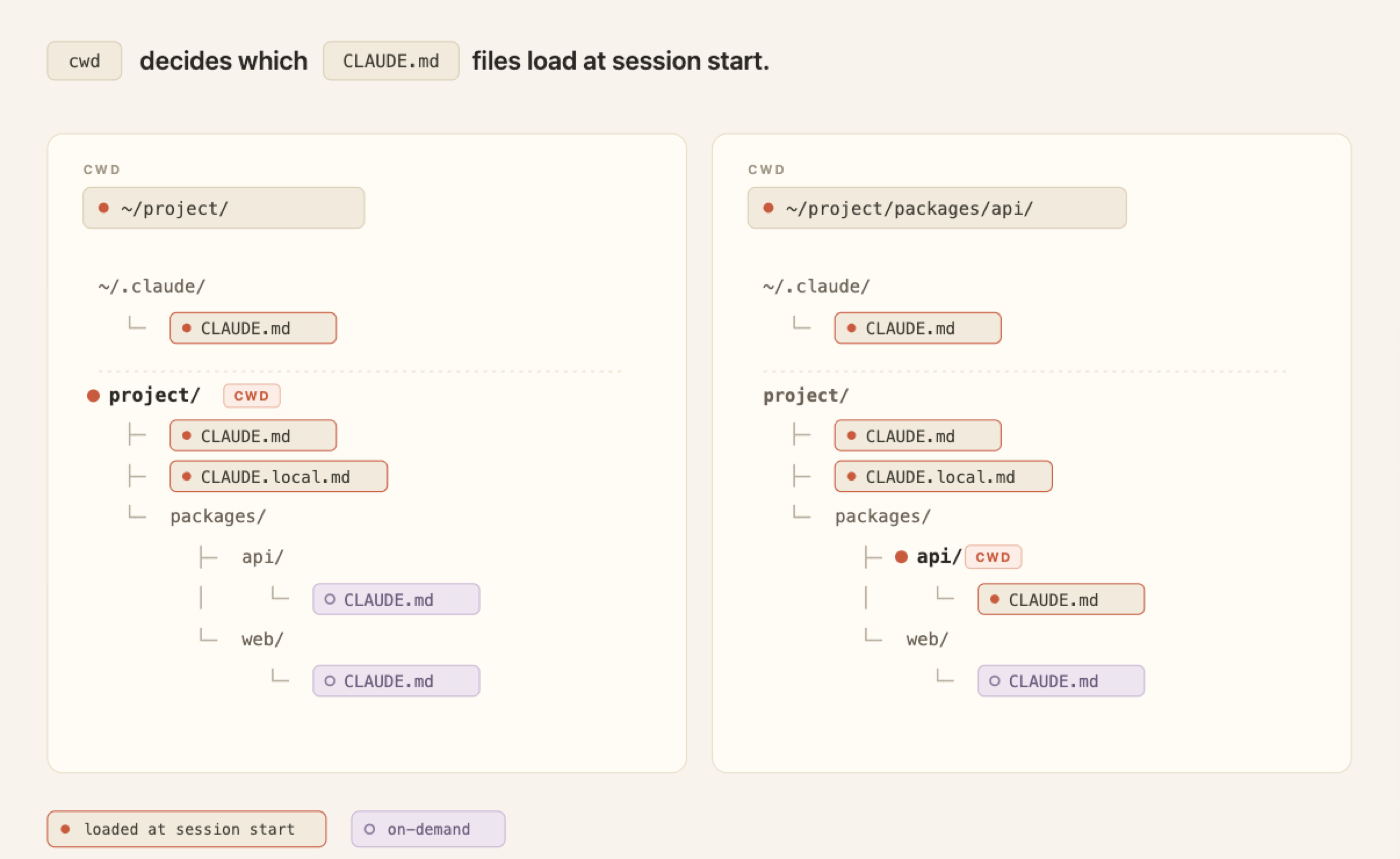
*当前工作目录(cwd)之下所有子目录里的 CLAUDE.md 文件,都会在 Claude 读取该目录内文件时载入。*
在共享仓库里,CLAUDE.md 会像任何无人认领的配置文件一样越长越大:每个团队都往里追加自己的指令,却没人删东西。这种成本会随规模累加。
每一行都会为仓库里每位工程师的每个会话载入,无论它和当前任务相不相关。这既消耗 token,也稀释了对那些真正要紧的指令的遵循度。随着文件变大,应当把团队特有的约定挪进按路径限定的 rules,把流程挪进 skills——它们只在相关时才载入。
Tip: 把 CLAUDE.md 控制在 200 行以内,给它指定一个负责人,并像审代码那样审查对它的改动。把这个文件想成是给 Claude 提供一份代码库概览,或者一个索引——指向其他文件,让 Claude 在需要时去那里找更多信息。
在 monorepo 里,给每个团队的目录配一份自己的子目录 CLAUDE.md,这样各团队只载入自己的约定;开发者还可以用 claudeMdExcludes 设置,跳过那些自己永远不碰其代码的团队的文件。
对于必须应用到组织内每一个仓库的标准——安全策略、合规要求——可以用一份集中管理的 CLAUDE.md,通过 MDM(移动设备管理)或配置管理下发到开发者机器上,而且它无法被个人设置排除掉。
关于如何配置 CLAUDE.md 的更多内容,见我们的博文 CLAUDE.md 文件:为你的代码库定制 Claude Code。
Rules
rules(规则文件) 是放在 .claude/rules/ 里的 markdown 文件,用来给 Claude 设定具体的约束或约定。
未限定范围(unscoped)的 rules 行为和 CLAUDE.md 一样:始终在会话开始时载入,并在压缩时重新注入。这可能浪费 token——即便对当前任务无关,也照样把它载入上下文。
按路径限定(path-scoped)的 rules 让你只在相关时才载入规则指令,做法是加一个 paths 字段来控制载入时机。
举个例子:一条限定到 src/api/** 的规则,在纯文档会话里就不会进入上下文。只有当 Claude 读取 src/api/ 目录内的文件时,它才会被载入。
写出来是这样:
---
paths:
  - "src/api/**"
  - "**/*.handler.ts"
---
All API handlers must validate input with Zod before processing.Tip:像"迁移脚本只能追加(migrations are append-only)"这种针对特定文件的约束,最适合作为一条 rule,放进它的 paths: frontmatter 里。当某条指令涉及横切关注点、或涉及散布在代码库多处(但不是全部)的某类文件时,优先用按路径限定的 rule,而不是嵌套的 CLAUDE.md 文件。
Skills
skills(技能) 存放在 .claude/skills/ 中,是一个个包含指令、脚本和资源的文件夹,由 Claude 动态载入。每个 skill 都有一个 SKILL.md 文件,含名称、描述和正文。
会话开始时只载入名称和描述;完整正文要等 Claude 调用该 skill 时才载入——调用方式要么是斜杠命令(slash command,如 /code-review),要么由任务自动匹配触发。
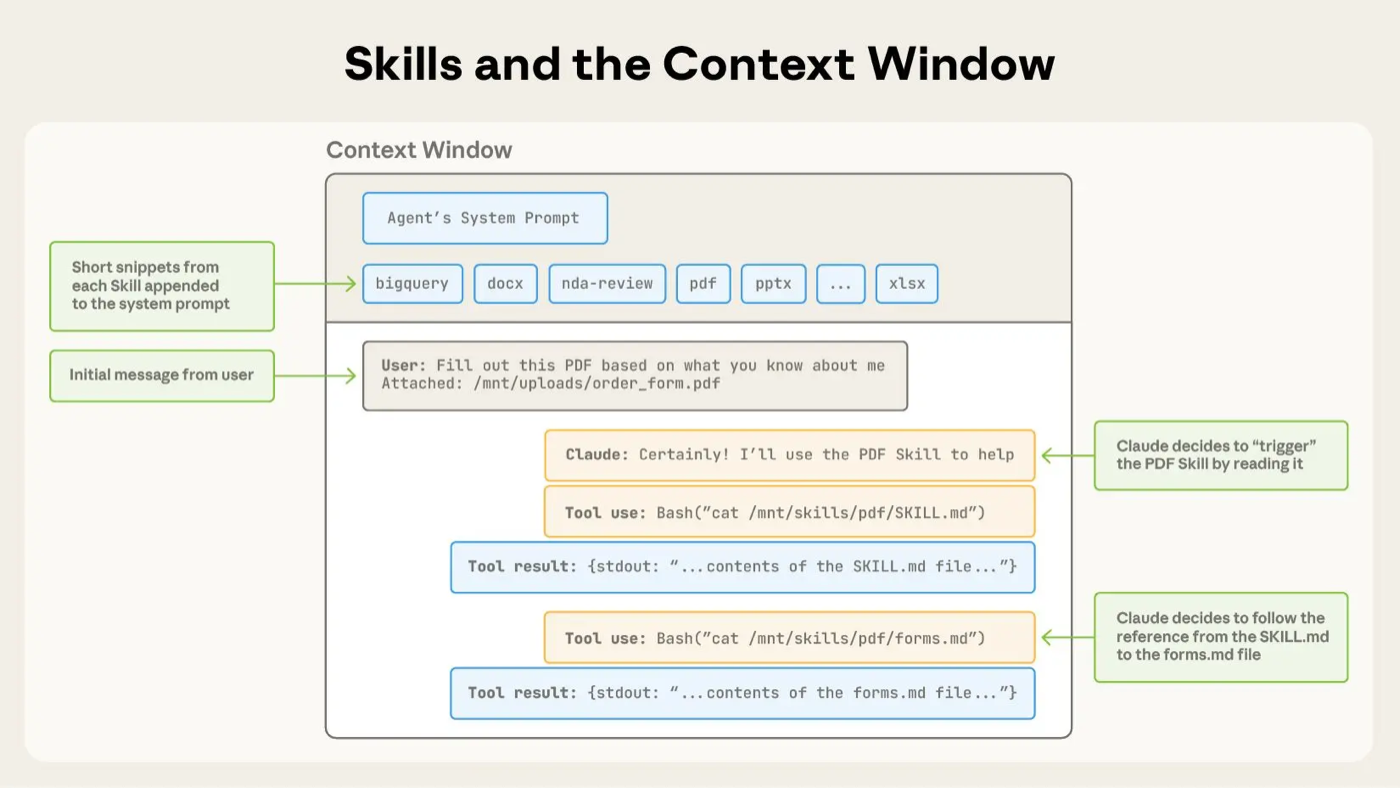
*skills 是通过你的 system prompt 触发的。*
举例来说,/code-review 是一个内置 skill,它会审查你当前的 diff(代码改动)并报告发现,但不改动文件。这个 skill 定义好了一套打法(playbook),于是每次你调用它,Claude 都按同样结构化的方式来做。
压缩时,Claude Code 会在一个总预算内重新注入已调用的 skills。如果你在一个会话里调用过很多 skills,最旧的会先被丢弃。
Tip: 流程化的指令——比如部署流程、发布检查清单、评审流程——应该放进 skill,而不是 CLAUDE.md。
Claude Code 自带了一批 skills,但你也可以写自己的自定义 skill。我们的 构建 Claude skills 完整指南 会教你怎么做。
Subagents
subagents(子智能体) 是放在 .claude/agents/ 里的 markdown 文件,用来为特定的旁路任务定义隔离的助手。每个文件用 YAML frontmatter(名称、描述,外加 model 和工具权限等可选字段),后面跟着的正文则成为这个 subagent 的 system prompt。
subagents 和 skills 有相似之处:名称、描述和工具列表都在会话开始时载入,但智能体正文里那一大块上下文不会自动调用。Claude 通过 Agent 工具来调用它们,传入一个 prompt 字符串。
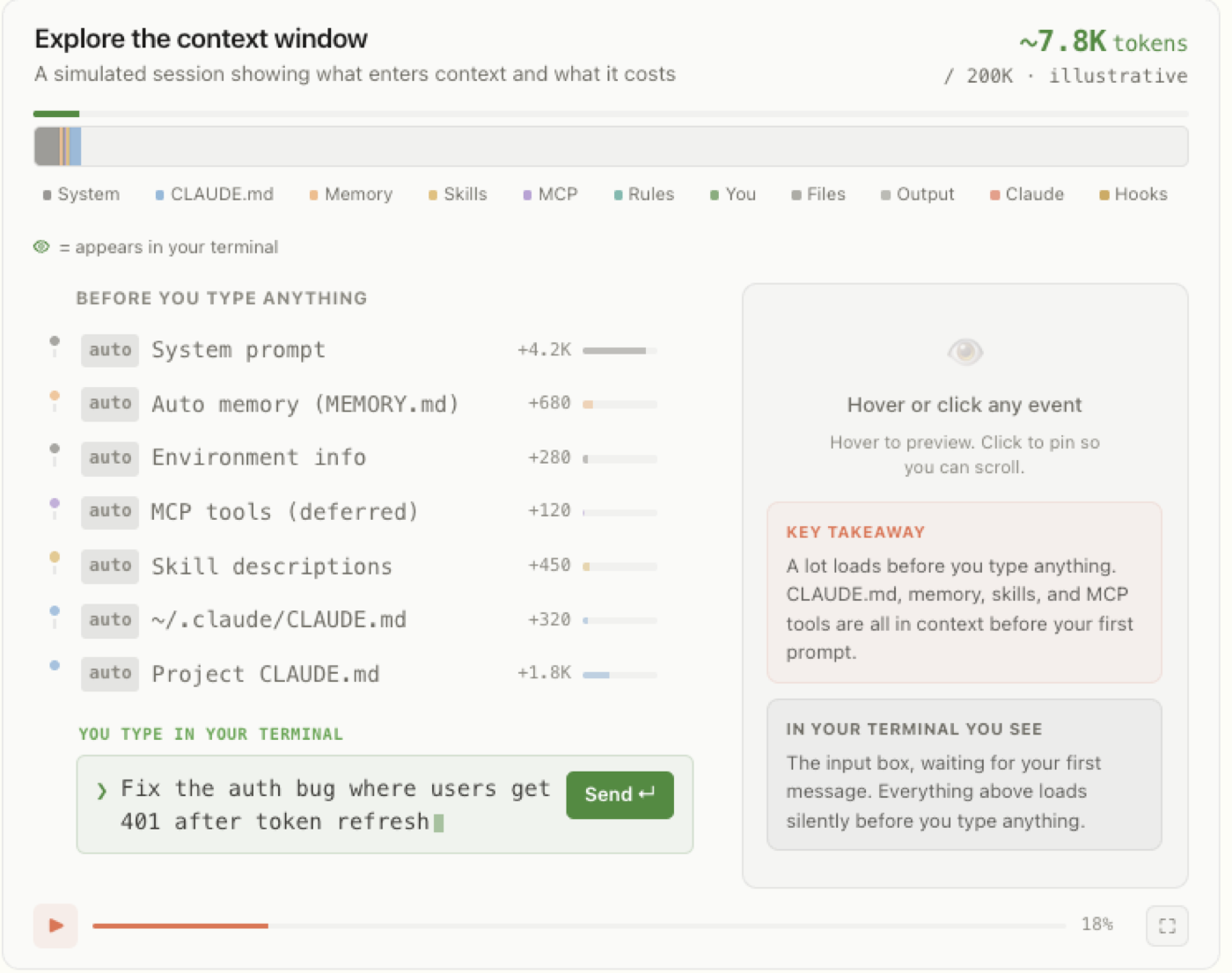
*Claude Code 的上下文窗口(context window)装着 Claude 关于本次会话所知道的一切。这里的交互式时间线 演示了什么内容在什么时候被载入。*
subagent 正文里那一大块指令性上下文不仅不会自动调用,它压根就不会进入父对话。
随后 subagent 在自己全新的上下文窗口里运行,唯一会回到你主会话里的,只有 subagent 的最终消息(往往是众多子任务的汇总结果)外加元数据。
这种模式能横向扩展:subagents 最多可以嵌套五层,而 动态工作流(dynamic workflows) 能编排几十到上百个后台智能体,且不需要你逐一指定 subagent 架构的每个细节。编排计划和中间结果存在脚本变量里,而不是 Claude 的上下文窗口里——这让你既能扩展规模,又不丢失指令的保真度。
Tip: 这种隔离性,正是该用 subagent 而非 skill 的主要理由之一。当一个旁路任务——比如深度检索、一遍日志分析、或一次依赖审计——会用你之后再也不会回看的中间结果塞满主对话时,就用 subagent。而当你希望整个流程在主线程里展开、好让你能看到并逐步引导每一步时,就用 skill。
Hooks
hooks(钩子) 是用户自定义的命令、HTTP 端点或 LLM 提示词,它们通过在 Claude 生命周期里的特定事件 上触发——比如文件编辑、工具调用、会话开始——来对 Claude 的行为提供更具确定性的控制。
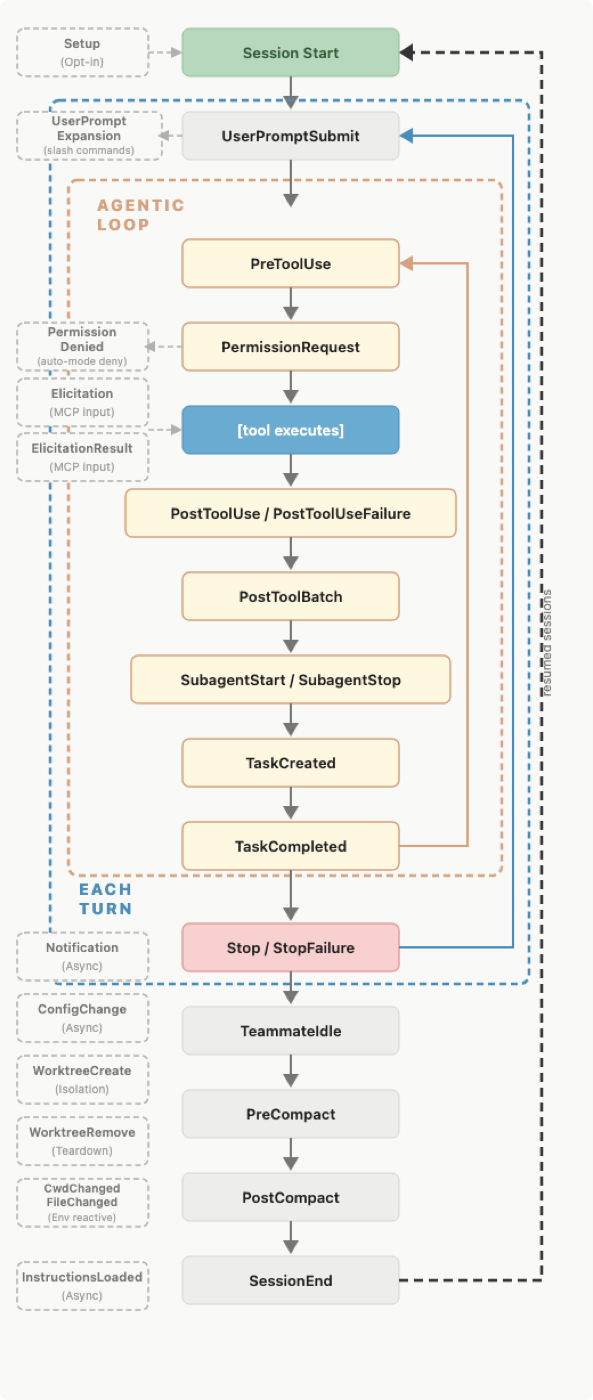
*一张图,标出了 Claude Code 会话里可触发 hook 的各个事件。*
你可以在 settings.json、受管策略设置(managed policy settings),或者 skill / agent 的 frontmatter 里注册 hooks。
hooks 有好几种类型:command、HTTP、mcp_tool、prompt 和 agent。所有 hooks 的触发都是确定性的。前三种的执行是确定性的,而后两种——prompt 和 agent——用的是 Claude 的判断,而非一套固定规则,来决定输出。
hooks 的上下文开销很低,因为它的配置或指令存在主上下文窗口之外。根据 hook 类型,由 harness(运行外壳)来运行处理器(command、http、mcp_tool),或者用独立的窗口发起模型调用(prompt、agent)。
有些 hooks 可能会把输出保存到主上下文窗口里。比如一个拦截型 hook 的标准错误会被存进上下文,好让 Claude 知道这次调用为什么被拒。
但大多数 hooks 不会把输出存进主窗口,除非配置里显式要求返回。假如你用 PreCompact 事件在压缩前把聊天记录备份到另一个文件里供日后参考,Claude 是不会知道哪个文件存了聊天记录的。
正是这一点,让这类 hook 与 CLAUDE.md、rules 和 skills 有了根本区别。更多内容见我们的博文 如何配置 hooks。
Tip: 凡是应当确定性发生的事,都用 hooks:编辑后跑 linter、完成时发 Slack、或在某些命令执行前拦截它们。一个 PreToolUse hook 可以检查任何工具调用,并以退出码 2 来拒绝它。
它们的上下文开销很低,因为它们是由 harness 运行的代码,而不是会被载入上下文、下达给 Claude 的指令。
Output styles
output styles(输出风格) 是放在 .claude/output-styles/ 里的文件,会把指令注入到 system prompt 中。它们永不被压缩,在每次会话开始时载入,并在会话内首次请求后被缓存——也就是说,它们的上下文开销是中等的。
正因为它们身处 system prompt 之中,output styles 在我们目前讲过的所有方法里,带有最高的指令遵循权重,应当谨慎使用。
改动 output style 会替换掉默认的 output style(除非你在风格的 frontmatter 里设了 keep-coding-instructions: true)。
在 Claude Code 里,这会移除那些告诉 Claude "你正在帮用户做软件工程任务"的指令,以及其他一些关键的默认指令,比如:
- 如何界定改动的范围;
- 何时该加、何时该省略代码注释;
- 遇到安全问题该怎么办;以及
- 一些验证习惯,比如在宣布工作完成前先跑测试。
默认情况下,自定义的 output style 会把上面这些全部丢掉,于是 Claude Code 就更像一个通用助手,而不是软件工程助手了。
Tip:在动手写自定义 output style 之前,先看看内置的几种风格。Proactive(主动)、Explanatory(讲解)和 Learning(学习)覆盖了最常见的需求(自主性、教学模式、协作编程),你不必为此维护一个风格文件。
追加 system prompt
修改 output styles 之外的另一个选择,是 append-system-prompt 标志。修改 output style 文件可能给 Claude 的行为带来大幅、意料之外的改变,而这个 append 标志只是对原始 system prompt 做加法。它不修改 Claude 的角色,只是往它的默认角色上再添加指令。
它同样是在调用时传入,并且只对那一次调用生效,而不是作为一个文件跨会话持久化。
相比其他传递指令的方法,追加 system prompt 的上下文开销可能更高。它会增加输入 token,不过会话内首次请求之后,prompt 缓存会降低这部分成本。让 Claude 用更啰嗦或更长的风格作答,也会增加输出 token。
Tip: 追加 system prompt 最适合用来添加具体的编码标准、输出格式,或特定领域的知识。但要记住,追加 system prompt 对遵循度有边际递减效应。一般来说,你用这种方式给的指令越多,Claude 遵守得越不严格,尤其是当其中有任何相互矛盾的指令时。
Claude Code 定制速查贴士
如果你发现自己在做下面某件事,或许就该考虑给你的指令换个地方放了:
在 CLAUDE.md 里写 "每次 X,就一定要做 Y"。 如果某个行为应当可靠地发生——比如每次编辑后跑 prettier、或完成时发 Slack——那就改用 settings.json 里的一个 hook。"模型选择去跑格式化工具"和"格式化工具自动运行",是两码事。
在 CLAUDE.md 里写 "绝不要做这件事"。 当有件事绝对不能发生时,指令是错误的工具。Claude 大多数时候会遵守指令,但在高压之下、在长会话或含糊情境里、或者因为任务过程中读到的某个文件里藏着 prompt 注入(prompt injection),模型就可能不遵守这条被提示的规则。真正的护栏(guardrail)必须是确定性的,而能做到强制执行的手段是 hooks 和 权限(permissions)。一个 PreToolUse hook 可以检查某次调用,并以退出码 2 拦截它。受管设置(managed settings) 走得更远:它们由管理员下发,无法被用户的本地配置覆盖,是唯一能在全组织范围内强制执行确定性护栏的办法。
在 CLAUDE.md 里写一段 30 行的流程。 流程属于 skills。CLAUDE.md 用来放 Claude 应当时刻持有的事实:构建命令、monorepo 布局、团队约定。而一份部署手册或一张安全评审清单,应该住在 .claude/skills/ 里——那里的正文只在被调用时才载入。
一条只针对某个 API、却没写 paths 的规则。 如果一条规则只适用于 src/api/**,用 paths: 给它限定范围,就能让它在无关工作期间不进入上下文。一条未限定范围的规则,在机制上和把内容直接塞进 CLAUDE.md 完全等价:始终载入,始终消耗 token。
把个人偏好写进项目级的 CLAUDE.md 文件。 所有基于文件的方法都有一个用户级(user-level)对应版本,它会为你每一个 Claude Code 会话载入,不管你身处哪个仓库。个人偏好(比如"始终使用语义化提交信息")应该用本地文件;而那些团队共享、但又只针对某个特定代码库的偏好,则留给项目级文件。
上手开始
想获取更多让 Claude Code 发挥到极致的贴士与模式——从配置你的环境,到跨多个并行会话扩展规模——可以查阅我们的 Claude Code 最佳实践 文档。
当你把其中几样跑通之后,就可以把它们中的许多(skills、subagents、hooks、output styles)打包成一个 插件(plugin),从而把一套连贯的配置分享给队友或跨项目复用。